在 uni-app 中,当 App 内嵌入的 Webview 窗口因为网络断开、服务器崩溃或网址错误导致 404、500、网络超时 等加载失败时,系统默认会弹出一个非常丑陋的系统报错白页(甚至直接弹窗报错)。
为了提升用户体验,我们可以自定义一个漂亮的错误提示页。按照官方规范,由于这个页面要在网络断开时也能本地读取,它必须是一个本地的静态 HTML 页面。
1. 建立目录结构
你的uni-app项目根目录
├── components/
├── pages/
├── hybrid/ <– 新建这个文件夹
│ └── html/ <– 新建这个文件夹
│ ├── error.html <– 你的自定义404/错误页面
│ └── css/ <– 可选,存放样式的文件夹
│ └── error.css
│ └── images/
│ └── app-logo.png
2. 编写 error.html 代码
<!DOCTYPE html>
<html lang=”zh-CN”>
<head>
<meta charset=”UTF-8″>
<meta name=”viewport” content=”width=device-width, initial-scale=1.0, user-scalable=no”>
<title>加载失败</title>
<style>
body {
margin: 0;
padding: 0;
font-family: -apple-system, BlinkMacSystemFont, “Segoe UI”, Roboto, sans-serif;
display: flex;
flex-direction: column;
align-items: center;
justify-content: center;
height: 100vh;
background-color: #f8f9fa;
color: #333;
}
.container {
text-align: center;
padding: 20px;
}
/* ——— 1. 修改图标/Logo的样式 ——— */
.app-logo {
width: 80px;
height: 80px;
border-radius: 18px; /* 让图标自带好看的圆角 */
box-shadow: 0 4px 12px rgba(0,0,0,0.08); /* 加一点淡淡的阴影 */
margin-bottom: 25px;
filter: grayscale(40%); /* 可选:让图标颜色稍微变淡,更有“出错/不可用”的视觉暗示 */
}
h2 {
font-size: 19px;
margin-bottom: 10px;
color: #2c3e50;
}
p {
font-size: 14px;
color: #7f8c8d;
margin-bottom: 35px;
}
.btn-retry {
padding: 12px 45px;
font-size: 15px;
color: #fff;
background-color: #007aff;
border: none;
border-radius: 25px;
box-shadow: 0 4px 6px rgba(0,122,255,0.2);
outline: none;
cursor: pointer;
-webkit-tap-highlight-color: transparent; /* 清除移动端点击高亮 */
}
.btn-retry:active {
background-color: #0062cc;
}
.footer {
position: absolute;
bottom: 30px;
text-align: center;
font-size: 12px;
color: #95a5a6; /* 淡淡的灰色,不抢主视觉 */
line-height: 1.8;
}
.footer a {
color: #007aff; /* 让电话号码变成蓝色,暗示可以点击 */
</style>
</head>
<body>
<div class=”container”>
<img class=”app-logo” src=”images/app-logo.png” alt=”App Logo”>
<h2>网络或页面加载失败</h2>
<p>请检查您的网络设置或稍后再试</p>
<button class=”btn-retry” onclick=”retry()”>重新加载</button>
</div>
<div class=”footer”>
<div>xxxx有限公司</div>
<div>客服热线:<a href=”tel:00″>187-0000-0000</a></div>
</div>
<script type=”text/javascript”>
function retry() {
window.location.reload();
}
</script>
</body>
</html>
3.在 manifest.json 中配置挂载
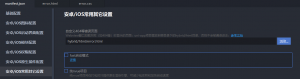
源码:
{
“name”: “你的项目名称”,
“appid”: “”,
“description”: “”,
/* … 其他配置 … */
“app-plus”: {
/* … 其他配置 … */
“error”: {
“url”: “hybrid/html/error.html”
}
}
}
这里的路径直接写 hybrid/html/error.html 即可。App 打包时,系统会自动把 hybrid/html 目录映射到本地的 file:/// 根路径下。
4. 测试验证
4.1 电脑连接安卓手机或 iPhone,在 HBuilderX 中点击 运行 -> 运行到手机或模拟器 -> 运行到 Android/iOS 基座。
4.2 在你的 uni-app 页面里放一个 <web-view> 组件,故意写错一个网址,例如:
HTML
<web-view src=”https://www.thisisawrongwebsite123456.com”></web-view>
或者在页面加载过程中,把手机的 Wi-Fi 和蜂窝网络全部关闭。
4.3 此时,App 内部就不会再弹窗报错,而是会完美平滑地展现你刚刚编写的 error.html 漂亮页面。